
The #1 App for North American Truckers — Trusted by 1M+ drivers for parking, stops, fuel & weigh stations.
Learn More


Our experts will contact you to discuss your needs
If you see an incoming call, that’s us: (***) *** -4060
Our agent will confirm a few quick details so we can match you to the right fleet navigation plan. Call missed? No problem, we’ll get in touch with you soon.
Step 1 – Pick Your Product
Step 2 – Get Started
The #1 App for North American Truckers — Trusted by 1M+ drivers for parking, stops, fuel & weigh stations.
Learn More
Optimize every mile with fleet navigation, dispatch, routing, and compliance.
Learn MoreStart Enterprise Trial
Find and book high-paying loads from your phone or desktop with our powerful loadboard.
Search OnlineHazmat route planning
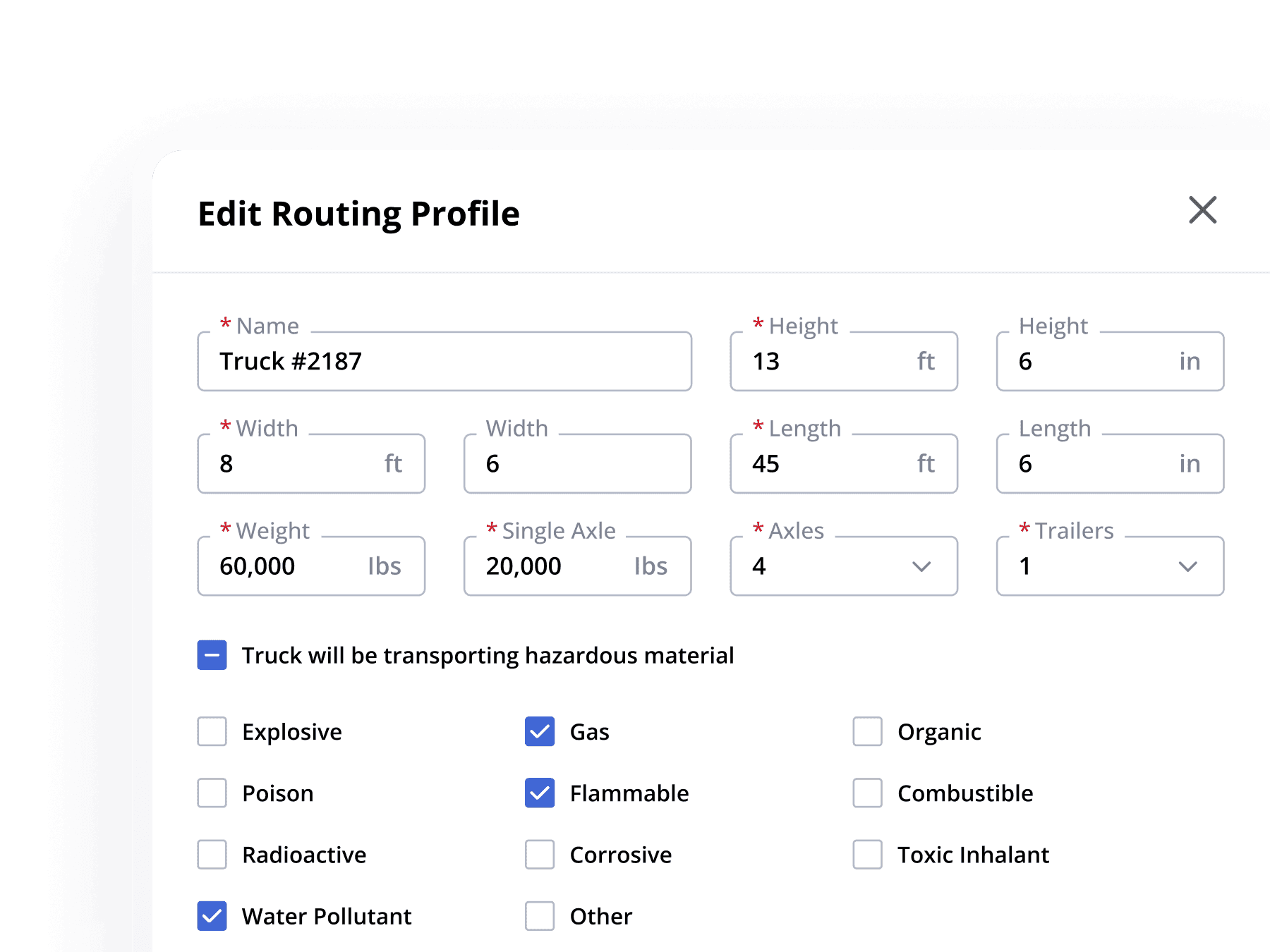
Set the truck dimensions, weights and hazardous material classes in one routing profile. The dispatcher selects that profile for the trip, and the planned route opens in the driver app.
How it is set up
Enter height, width, length, gross and single-axle weight, axle count and trailer count. Name the profile for the truck or equipment type.
Enable hazardous material, then tick the classes on the trailer. More than one class can be selected.
Choose the profile, compare the route options, then send the planned trip to the Trucker Path app. The driver does not re-enter the settings.
One profile, clear responsibility
The routing profile keeps the vehicle and its declared material together for trip planning. It does not replace the carrier's operating responsibilities.
Dimensions, weights, axles, trailers and the selected hazardous material classes live in the same named routing profile.
The fleet edits the profile before planning and sends the resulting trip to the driver. The driver receives the route in the app.
Placards, shipping papers, permits, endorsements and any state or local designated-route rule remain the carrier's and the driver's. The software plans the route; it does not take on the obligation.
FAQ
You start from the load, not from the map. Before a route is built, the truck needs a profile that says what it is and what it is carrying: height in feet and inches, width, length, gross weight, single axle weight, axle count and trailer count, and then the hazardous material it is hauling. In Trucker Path for Fleets that last part is a checkbox on the routing profile — "Truck will be transporting hazardous material" — which opens a list of classes: Explosive, Gas, Organic, Poison, Flammable, Combustible, Radioactive, Corrosive, Toxic Inhalant and Water Pollutant, plus Other. A dispatcher ticks the ones that apply to that trailer. The profile is then chosen on the trip itself, beside the stops and the Plan Route button, and the route is built against it. The route the driver opens in the Trucker Path app is the one that was planned. What this does not do is discharge the carrier: placards, shipping papers, permits and any state or local designated-route rule remain the carrier's responsibility, and a driver hauling hazmat still needs the endorsement.
The hazardous material list on the Trucker Path for Fleets routing profile includes Explosive, Gas, Organic, Poison, Flammable, Combustible, Radioactive, Corrosive, Toxic Inhalant, Water Pollutant, and Other for anything the list does not name. More than one can be ticked at the same time, because a trailer often carries more than one.
Consumer navigation apps have no field for a hazmat class, a trailer count or an axle weight, so there is nowhere to tell them what the truck is carrying and nothing for them to route around. That is the difference a commercial routing profile makes: the restriction data only becomes useful once the software knows the vehicle it is routing. A driver hauling placarded freight needs routing built on a truck profile, and a fleet needs that profile set once by a dispatcher rather than re-entered by each driver on each trip.
Per routing profile. A profile is the truck as configured — its dimensions, weights, axles, trailers and hazardous material classes — and it is named, so a fleet typically keeps one per truck or per equipment type. When a trailer changes what it hauls, the dispatcher edits the profile rather than re-entering the details on the trip, and every route planned afterwards uses the new setting.
No. The profile is set by a dispatcher in Trucker Path for Fleets and the trip is sent to the driver, who opens it in the Trucker Path app they already use. The driver is not retyping a height or ticking a hazmat class at the start of a run.
Yes. Routes are offered as Fastest, Shortest and Economical and can be compared side by side with drive time, distance, estimated fuel cost and toll fee for each, and a dispatcher can set preferred roads or areas to avoid. All of those options are calculated on the same truck profile, so what you set is in effect for every one of them rather than for a default only.
No, and no routing software honestly can. The software builds the route from the truck profile you set and the restriction data in the map, which is why the profile has to be right. Placarding, shipping papers, permits, endorsements and any state, county or city designated-route requirement stay with the carrier and the driver. What the product changes is that the dispatcher plans on the truck as it actually is, and the driver follows the route that was planned rather than one a car app produced.
The same routing profile carries the truck name, height in feet and inches, width, length, gross weight, single axle weight, axle count and trailer count. Those are what low bridges, weight-limited roads and restricted corridors are checked against, so the hazmat classes are one part of a single description of the vehicle rather than a separate setting somewhere else.
Still have questions?navpro@truckerpath.com
Enter one truck, tick what it hauls, and see the route your driver would get. Seven days, no charge.
Start Free Trial