
The #1 App for North American Truckers — Trusted by 1M+ drivers for parking, stops, fuel & weigh stations.
Learn More


Our experts will contact you to discuss your needs
If you see an incoming call, that’s us: (***) *** -4060
Our agent will confirm a few quick details so we can match you to the right fleet navigation plan. Call missed? No problem, we’ll get in touch with you soon.
Step 1 – Pick Your Product
Step 2 – Get Started
The #1 App for North American Truckers — Trusted by 1M+ drivers for parking, stops, fuel & weigh stations.
Learn More
Optimize every mile with fleet navigation, dispatch, routing, and compliance.
Learn MoreStart Enterprise Trial
Find and book high-paying loads from your phone or desktop with our powerful loadboard.
Search OnlineBackhaul and empty miles
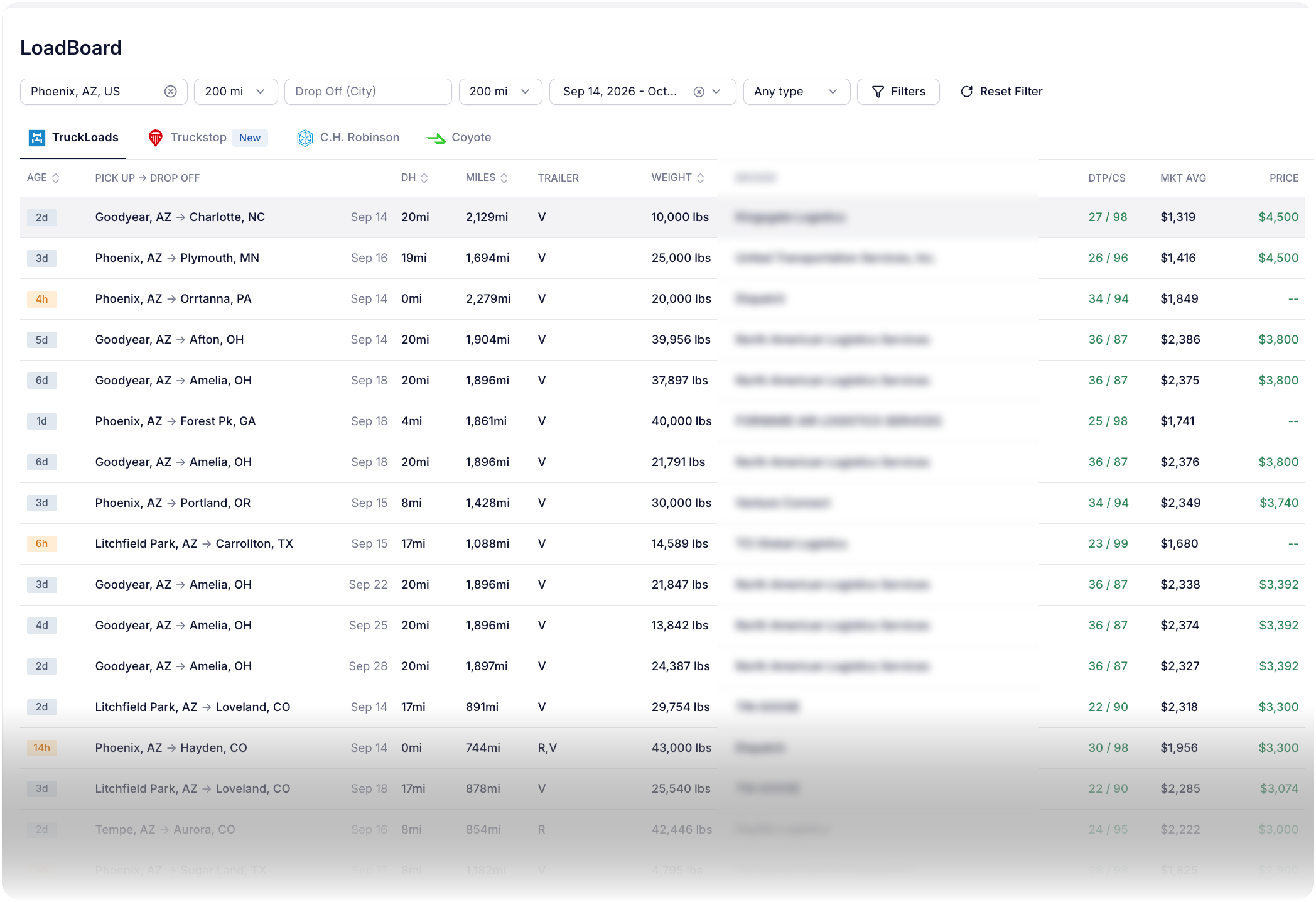
Search outbound from the city where the truck will unload, on the days it will be empty. Then compare deadhead, the lane average and broker payment history before booking the return leg. Trucker Path keeps the boards you already use on one screen and sends the chosen load into dispatch without retyping.
The method
Set pickup near the delivery city, choose the days the truck will be free and point the drop-off toward home or the next committed load.
Keep one set of filters while moving between TruckLoads, Truckstop, C.H. Robinson and Coyote.
Read deadhead, tolls and driving time beside the posted price, lane average and broker payment record.
Add to Trips carries over the stops and appointment windows, routes for the assigned truck and sends the trip to the driver app.
Before you book
The posted price is only one part of the decision. Compare what the truck must spend, when the broker pays and what actually ran.
A nearer load can net more than a higher-paying load when the truck must run farther empty. Deadhead sits on the result row; toll and driving estimates appear in the load detail.
Compare the posted price with the market average, then read the broker's days to pay and credit score before accepting the load.
Driver Performance shows total miles, completed trips and excess miles by driver. Fleets can also pull scheduled, actual and out-of-route miles through the fleet API.
“Our driver managers are hearing very positive feedback about the safe and efficient routes we are providing with the Trucker Path app, and they’re reporting that any issues getting new drivers enrolled or up to speed are being handled quickly.”
“Do you know that we saved our toll bill that month was $40,000 less than it normally is? It was only $40,000-some versus $84,000-some, and so we’re like, ooh, that, and it was not, it was Trucker Path.”
“The features are clear-cut and straightforward to use — very convenient. As a towing business with heavy loads, the convenience of our truckers being able to self-adjust their routes is a key benefit for us.”
FAQ
The usual way is a load board, searched backward: instead of looking for freight near the truck now, they search outbound from the city the truck is about to unload in, on the days it will be empty, filtered to the trailer they are pulling. The loads that come back are the candidate backhauls. The fleet then judges each one on three things — how far the truck must run empty to reach the pickup, what the lane normally pays, and whether the broker pays reliably — and books the one that covers the return leg best. Fleets that hold more than one board check more than one, because a lane that looks thin on one may not be thin on another. In Trucker Path for Fleets the boards sit as tabs on one screen — TruckLoads, which is built in, plus Truckstop, C.H. Robinson and Coyote once those accounts are connected — so moving from one to the next is a click rather than another login. Every row shows deadhead miles to the pickup, total miles, weight, trailer type, the broker with their days to pay and credit score, the market average rate for the lane and the posted price, and opening a load adds the estimated toll charge and estimated driving time. Taking one turns it into a dispatched trip routed on that truck's own height, weight, length and axle count.
A backhaul is the load a truck carries on the return leg of a trip, after it has delivered the freight it went out with. The outbound leg is the headhaul. If no backhaul is booked, the truck runs that return leg empty, and those empty miles are called deadhead: the fuel, the hours and the wear are spent, and nothing is earned against them. Finding a backhaul is the direct way a fleet turns a return leg from a cost into revenue.
They describe the same stretch of road from opposite sides. Deadhead is distance driven with an empty trailer, most often the run home after a delivery or the run from where the truck sits to where the next load is waiting. A backhaul is freight booked to fill that stretch. Booking a backhaul removes deadhead miles; failing to book one leaves them. On a load board the two appear together: the deadhead column tells you how far the truck must run empty to reach a load, so a load with a high posted rate and eighty miles of deadhead can be worth less than a nearer load that pays less.
Three things are within a dispatcher's control. Search from the delivery point rather than from the yard, so the return leg is being planned while the truck is still loaded rather than after it is empty. Judge every candidate load with the deadhead to its pickup included, not on the posted rate alone. And measure what actually happened afterwards, per driver and per period, because a lane that repeatedly runs empty is a routing or a sales problem, not a dispatch accident. Trucker Path for Fleets supports all three: the board shows deadhead on every row before you book, and Driver Performance reports total miles, trips completed and excess miles by driver after the fact. Fleets that read the figures back into their own systems can pull out-of-route, scheduled and actual miles per driver through the fleet API.
In Trucker Path for Fleets, yes. The load board sits under Marketplace with four tabs on one screen — TruckLoads, Truckstop, C.H. Robinson and Coyote — with the pickup and drop-off radius, date range and trailer filters in one bar above them. TruckLoads is built in. The other three are accounts the fleet already holds elsewhere and connects once: Truckstop through a Truckstop login, C.H. Robinson with an MC number and a C.H. Robinson ID number from a load confirmation, and Coyote with a Client ID and an API key from Coyote support.
The load row carries the numbers the decision needs: deadhead miles to the pickup, total loaded miles, weight, trailer type, the broker, the broker's days to pay and credit score, the market average rate for that lane, and the posted price. Opening the load adds the estimated toll charge and the estimated driving time. A lane that looks profitable on the posted rate alone can stop looking profitable once deadhead and toll sit on the same screen, which is the point of having them there.
Add to Trips turns the load into a trip in Trucker Path for Fleets, with its stops and appointment windows carried over, routed on that truck's own height, weight, length and axle count, and sent to the driver in the Trucker Path app they already use. Nothing is retyped between the board and the dispatch board, because they are the same product.
TruckLoads, the Trucker Path load board for carriers and owner-operators, is free to search and is a reasonable place to start if you run one or two trucks. The load board inside Trucker Path for Fleets is a paid dispatcher tool — an add-on seat on an operator who already holds a Trucker Path for Fleets seat. What it adds is the other three boards on the same screen, the broker credit and market rate columns, and the handoff straight into a dispatched trip.
No. Truckstop, C.H. Robinson and Coyote each stay your account, billed and administered by them. Connecting one puts its loads on the same screen as the others so a dispatcher compares them side by side instead of opening four tabs, and a load from any of them can be turned into a dispatched trip the same way.
Still have questions?navpro@truckerpath.com
Compare connected boards, see deadhead, tolls and broker details, then send the chosen load into dispatch. Seven days, no charge.
Start Free Trial